
How a Trading Company Eliminated Manual Purchase Order Processing With AI

Every purchase order that arrived at the operations team meant the same thing.
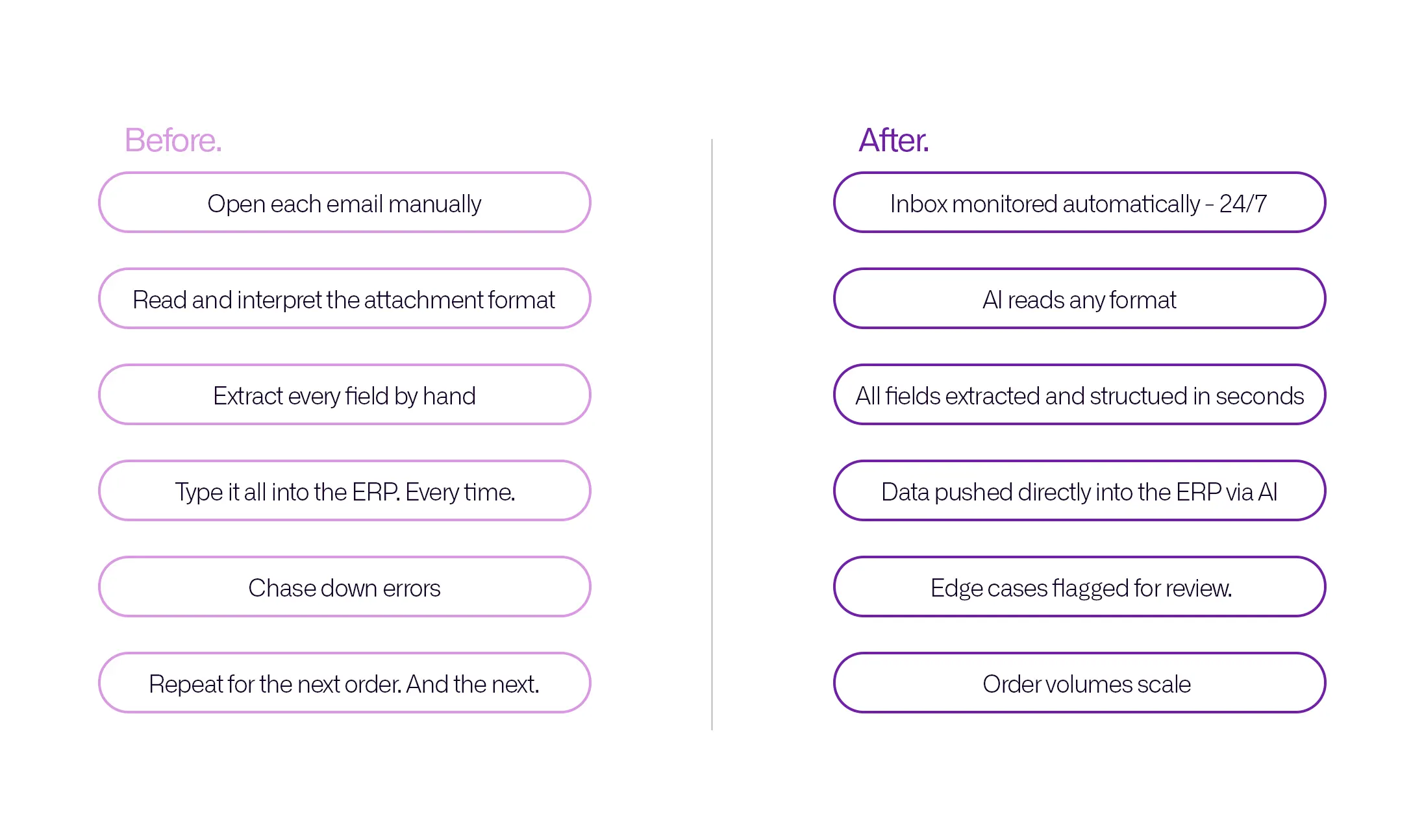
Someone had to open the email, read the attachment, interpret the format, extract the relevant details, and type them manually into the ERP system. Customer name. Product codes. Quantities. Pricing. Delivery information. Order references. Every field, every time, by hand.
On a quiet day, this was manageable. As order volume grew, it became a bottleneck that the business could not scale past without adding people whose entire job was data entry. And the more people touching the data, the more errors were introduced. Wrong quantities. Misread product codes. Pricing entered incorrectly. Each one requires time to identify, correct, and reconcile downstream.
This is the situation that led a trading company to approach Purple Software. The problem was not unusual. It is one of the most common operational drains in any business that receives purchase orders from multiple customers in multiple formats. What made it fixable was that the underlying logic, reading a document, extracting the relevant fields, and updating the system, is something an AI agent can do better than a person and can do continuously without fatigue or error.
The Problem in Detail
The business was receiving purchase orders through email in a range of formats. Some customers sent structured PDFs. Others sent scanned documents. Some sent the order details in the email body itself. A few sent images of handwritten or printed forms.
Each format required a different reading approach. There was no single template to follow. The operations team had developed an understanding of each customer's format over time, a form of institutional knowledge that existed in people's heads rather than in any documented system.
The process looked like this. An email arrived. A team member opened it, identified the purchase order, found the relevant attachment or read the body, extracted the data fields one by one, and manually entered each one into the ERP system. Then moved on to the next email.
As order volume increased, this process consumed more and more of the operations team's time. The risk of error increased proportionally. And the team had no way to scale the volume without adding headcount dedicated entirely to data entry work.
Three specific problems made this particularly costly.
Multiple unstructured formats
No two customers formatted their purchase orders the same way. The team had to interpret each one individually rather than following a consistent process.
High error rate
Manual data entry at high volumes is inherently error-prone. A misread quantity or an incorrect product code created downstream problems in inventory management, fulfillment, and invoicing that took time to identify and fix.
No ability to scale
More orders meant more manual work at a linear rate. There was no way to increase order volume without increasing the team handling the entry work.
What Purple Built
Purple designed and built an AI-powered purchase order automation system that handles the entire process from email receipt to ERP update without any manual intervention.
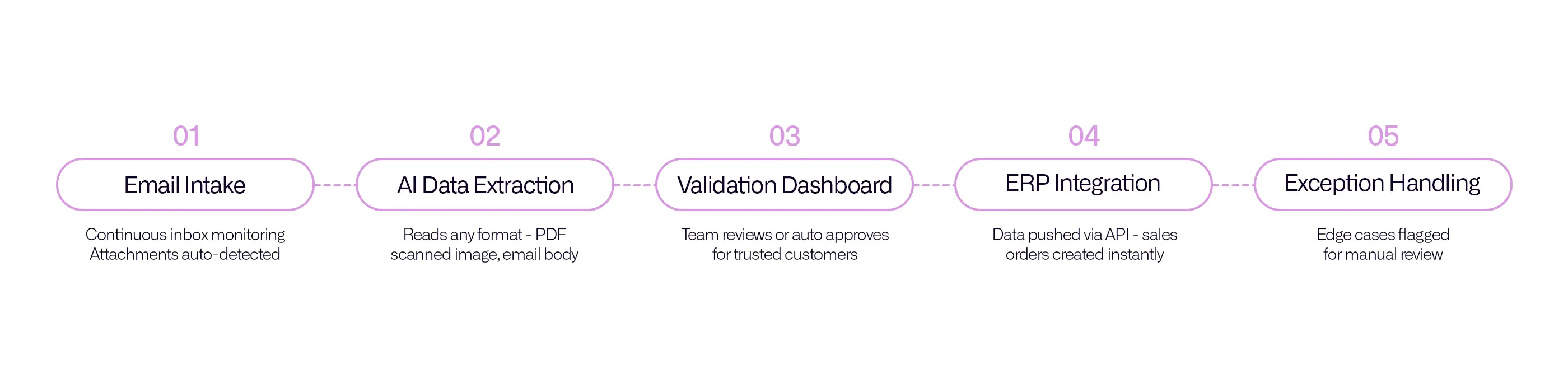
The system works in five stages.
Stage 1: Email and document intake
The system continuously monitors the company's inbox. When an email arrives that contains a purchase order, the system detects it automatically, identifies the relevant attachment or body content, and sends it to the processing engine. The operations team does not need to sort or route anything manually.
Stage 2: AI data extraction
An AI extraction engine reads the document regardless of its format. PDF, email body, scanned image, or text-based attachment. It identifies and extracts the structured data fields needed. Customer details, product names, quantities, pricing, delivery information, and order references.
It handles each customer's format automatically, learning the patterns specific to each supplier over time.
Stage 3: Validation dashboard
Extracted data is displayed in a review dashboard before it enters the ERP system. The operations team can see every order, approve it, or make corrections if needed.
Trusted customers can be set to auto-approve, removing the review step entirely for high-confidence sources.
Stage 4: ERP integration
Approved order data is pushed directly into the existing ERP system via API integration. Sales orders, purchase orders, and inventory updates are created automatically.
The team does not touch the ERP manually for any order that goes through the system.
Stage 5: Exception handling
If the system encounters a document it cannot process with confidence, it flags it and alerts the team for manual review.
Nothing is processed incorrectly. Edge cases are escalated rather than guessed at.
The system was built and delivered in 24 days.
What Changed After Go-Live
The most immediate change was that the operations team stopped doing data entry.
Orders that previously required a team member to manually read, interpret, and enter data into the ERP now flow through automatically. The system processes each one in seconds. The team's interaction with the process is reduced to reviewing flagged exceptions, which represent a small fraction of total order volume.
The error rate on order data dropped significantly. When a human is no longer transcribing information by hand, the category of errors that come from misreading, mistyping, or entering data into the wrong field simply does not occur. The data in the ERP is what the document said, extracted accurately and consistently every time.
The business can now handle higher order volumes without adding headcount. The system processes orders at any volume without the throughput changing. Whether ten orders arrive on a Monday or a hundred arrive on a Friday, the processing time and accuracy remain the same.
And because the system runs continuously, orders that arrive outside business hours are processed and ready in the ERP by the time the team starts the next day. There is no backlog to clear in the morning.
Why This Problem Is More Common Than Most Businesses Realise
Manual purchase order processing is one of those operational problems that gets absorbed into the working day gradually. Each individual order does not take long. The team manages it. Nobody raises it as a critical issue because it is just how things work.
But the cumulative cost is significant.
A team member spending three hours a day on purchase order data entry is spending over 700 hours a year on work that an automated system handles in seconds. At any reasonable salary, that is a substantial operational cost. And it does not include the downstream cost of errors, the time spent identifying and correcting them, or the constraint it places on the business's ability to grow volume.
The question for any business receiving purchase orders manually is not whether this is worth automating. It is whether the volume has reached the point where the cost of not automating is higher than the cost of building the system. For most businesses processing more than 20 to 30 orders a week, the answer is yes.
What This Looks Like for Similar Businesses
The solution built for this client is not specific to one industry or one type of business. Any company that receives structured documents from external parties and manually enters the data into an internal system is dealing with the same underlying problem.
Import and export businesses receive supplier invoices. Wholesale distributors process retailer purchase orders. Logistics companies handle booking confirmations. Manufacturers receive component orders. The format of the documents differs. The problem is the same.
The components of the solution are also consistent across these contexts. An intake system that monitors and captures incoming documents. An extraction engine that reads and structures the data. A validation layer that keeps a human in the loop for edge cases. An integration that pushes approved data into the existing system. And exception handling that flags anything outside the normal pattern.
What varies is the specific ERP or system being integrated with, the document formats the customers use, and the validation rules that determine what gets auto-approved versus reviewed. All of these are designed around the specific business rather than a generic template.
About Purple Software
Purple Software builds AI automation systems and custom software for businesses that are ready to stop doing manually what a system can handle better.
If your team is processing incoming documents by hand and entering data into a system that could be receiving it automatically, show us the process. We will map out what automating it would look like for your specific setup and tell you honestly what the result would be.
Book a free session at purple.lk